
In the previous post, we prepared the ProtonVPN integration with OpenWrt so that all traffic from your local network can be routed through the VPN.
However, as previously mentioned, this is not ideal. The best approach is to route traffic based on specific conditions, such as domains, ports, and so on, because there are still websites we would rather access using our real IP address (websites that use CDNs, speed tests, among others). And that is exactly what the PBR (Policy-Based Routing) package is designed to do.
It works as illustrated below:
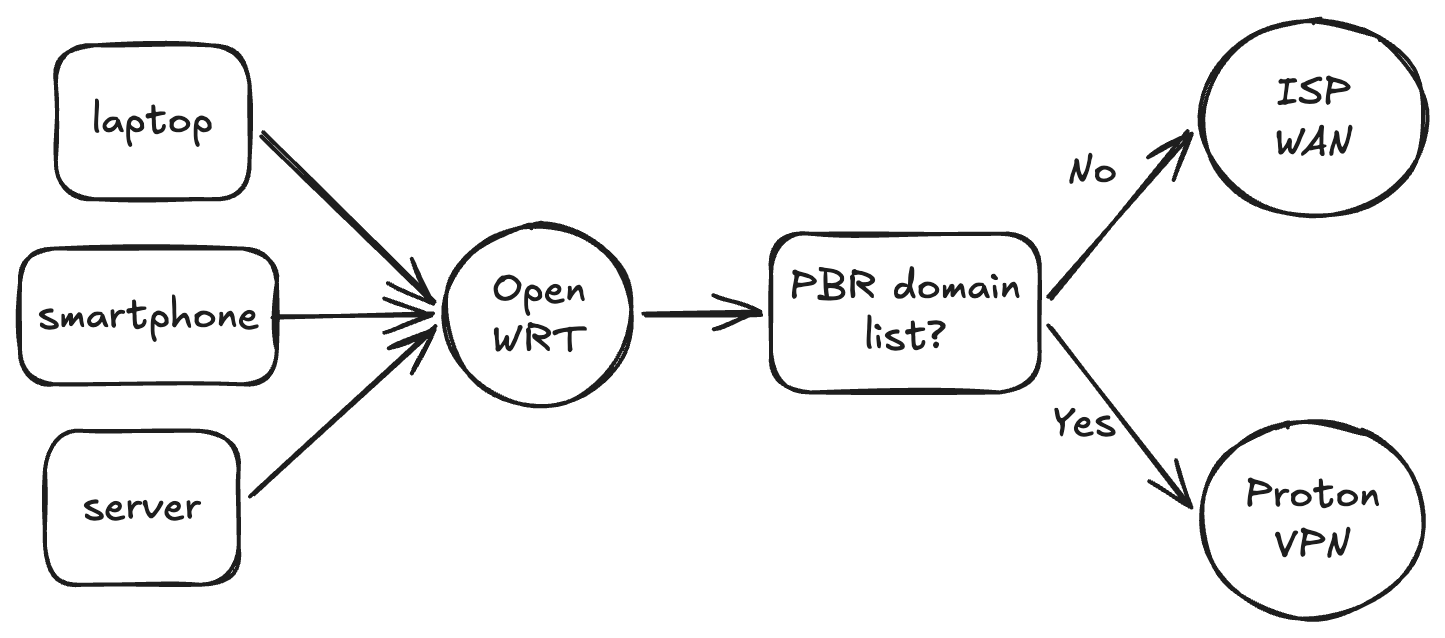
Note: This post assumes that you configured the WireGuard interface as shown in part #2.
Choosing the domains
That depends largely on how you use the internet.
For example, with the introduction of the Felca Law (ECA Digital) in Brazil and similar laws in other countries, some websites may require identity verification before granting access. If you would rather not complete this verification on a particular website, you can add its domain to PBR so that it identifies you as a user from another country.
Another example is P2P systems. You may want to route all traffic from P2P websites through the VPN. I will not go into further detail here, though.
Basically, this is useful for any website you want to route through the VPN across your entire network, without having to install VPN clients on each device.
Pre-configuration
First, we need a few packages, including dnsmasq-full. OpenWrt normally comes with the standard dnsmasq package, so we need to remove it before installing the full variant. This package is important because it supports nft sets, allowing PBR to create domain-based rules.
apk update
apk del dnsmasq
apk add dnsmasq-full pbr luci-app-pbr
As always, let’s create a few backups first:
TS="$(date +%Y%m%d-%H%M%S)"
[ -f /etc/config/pbr ] && cp /etc/config/pbr "/etc/config/pbr.backup.$TS"
[ -f /etc/config/firewall ] && cp /etc/config/firewall "/etc/config/firewall.backup.$TS"
[ -f /etc/config/dhcp ] && cp /etc/config/dhcp "/etc/config/dhcp.backup.$TS"
To reiterate an important point from the previous post, PBR will decide which traffic goes through the VPN, so the WireGuard interface must not automatically create the default route. Make sure the following option is set to false:
uci set network.proton0.route_allowed_ips='0'
uci commit network
/etc/init.d/network reload
Configuration
To begin configuring PBR, enable it with the following command:
uci set pbr.config.enabled='1'
Since we installed dnsmasq-full, we can configure PBR to use dnsmasq’s nft sets support. This is the main option for using domains as PBR conditions.
uci set pbr.config.resolver_set='dnsmasq.nftset'
Now there are a few important details to decide.
One relevant option is to block the selected domains if the VPN is not working. This is, of course, a personal choice that depends on the domains you use, but I consider it important to prevent any kind of leak. In my experience, at least with ProtonVPN, it is very rare for the VPN to stop working. It may occasionally go down for one or two seconds, but it comes back quickly because the connection is always restored automatically. This behavior is configured through the strict_enforcement option:
uci set pbr.config.strict_enforcement="1"
Another important option is enabling IPv6 in PBR. When I first started using PBR, I forgot to enable it and many things did not work. It took me a while to remember that IPv6 was the reason. So I recommend enabling it.
uci set pbr.config.ipv6_enabled="1"
With PBR configured, we need to create the conditions, or policies. The important part here is defining the domains. We will use ifconfig.me as a test for this post and apply the configuration. To specify more than one domain, simply separate them with spaces. Basically, the block below defines that all traffic destined for the domains listed in dest_addr must go through the proton0 interface.
uci add pbr policy
uci set pbr.@policy[-1].name="Selected domains via Proton"
uci set pbr.@policy[-1].interface="proton0"
uci set pbr.@policy[-1].dest_addr="ifconfig.me"
uci commit pbr
/etc/init.d/pbr restart
At this point, everything should be working correctly.
Testing
Since only ifconfig.me is being routed through the tunnel, we will make requests to it to verify that both IPv4 and IPv6 return IP addresses from the country selected in ProtonVPN.
curl -4 ifconfig.me
curl -6 ifconfig.me
Compare the results with your current ISP address. You can use icanhazip.com for comparison:
curl -4 icanhazip.com
curl -6 icanhazip.com
If the results are different, the configuration is working correctly, since one request goes through the VPN and the other does not. To make sure, you can look up the IP address returned by ifconfig.me on ipinfo.io and check whether it belongs to the country you selected.
Conclusion
I use everything shown here on my local network every day. It has helped me maintain a certain degree of operational security on some of the websites I visit.
Below is the complete script I use to configure PBR. Whenever I add a new domain, I run the script to synchronize it with the OpenWrt configuration.
./setup-pbr.sh
#!/bin/sh
set -e

# ---------- EDIT THESE ----------
VPN_IFACE="proton0"   # your existing OpenWrt WireGuard interface name
POLICY_NAME="Selected domains via Proton"
DOMAINS="ifconfig.me icanhazip.com test-ipv6.com" # example domains; use whichever ones you prefer

# 1 = block these domains if VPN is down; 0 = allow fallback
STRICT_ENFORCEMENT="1"

# 0 unless ProtonVPN interface has working IPv6
IPV6_ENABLED="0"

# Set to 1 only if LAN -> VPN firewall forwarding is not already configured
CREATE_FIREWALL_ZONE="0"
VPN_ZONE_NAME="protonvpn"
LAN_ZONE_NAME="lan"
# -------------------------------

echo ">>> Checking interface: $VPN_IFACE"
uci -q get network."$VPN_IFACE" >/dev/null || {
  echo "ERROR: network.$VPN_IFACE does not exist. Set VPN_IFACE to your WireGuard interface name."
  exit 1
}

echo ">>> Backing up configs"
TS="$(date +%Y%m%d-%H%M%S)"
[ -f /etc/config/pbr ] && cp /etc/config/pbr "/etc/config/pbr.backup.$TS"
[ -f /etc/config/firewall ] && cp /etc/config/firewall "/etc/config/firewall.backup.$TS"
[ -f /etc/config/dhcp ] && cp /etc/config/dhcp "/etc/config/dhcp.backup.$TS"

echo ">>> Installing pbr and dnsmasq-full"
apk update

if ! apk info -e dnsmasq-full >/dev/null 2>&1; then
  apk del dnsmasq 2>/dev/null || true
  apk add dnsmasq-full
fi

apk add pbr luci-app-pbr

if [ "$CREATE_FIREWALL_ZONE" = "1" ]; then
  echo ">>> Creating firewall zone/forwarding for $VPN_IFACE"

  ZONE_EXISTS="0"
  i=0
  while name="$(uci -q get firewall.@zone[$i].name)"; do
    [ "$name" = "$VPN_ZONE_NAME" ] && ZONE_EXISTS="1"
    i=$((i + 1))
  done

  if [ "$ZONE_EXISTS" = "0" ]; then
    uci add firewall zone
    uci set firewall.@zone[-1].name="$VPN_ZONE_NAME"
    uci set firewall.@zone[-1].input='REJECT'
    uci set firewall.@zone[-1].output='ACCEPT'
    uci set firewall.@zone[-1].forward='REJECT'
    uci add_list firewall.@zone[-1].network="$VPN_IFACE"
    uci set firewall.@zone[-1].masq='1'
    uci set firewall.@zone[-1].mtu_fix='1'
  fi

  FWD_EXISTS="0"
  i=0
  while src="$(uci -q get firewall.@forwarding[$i].src)"; do
    dest="$(uci -q get firewall.@forwarding[$i].dest)"
    [ "$src" = "$LAN_ZONE_NAME" ] && [ "$dest" = "$VPN_ZONE_NAME" ] && FWD_EXISTS="1"
    i=$((i + 1))
  done

  if [ "$FWD_EXISTS" = "0" ]; then
    uci add firewall forwarding
    uci set firewall.@forwarding[-1].src="$LAN_ZONE_NAME"
    uci set firewall.@forwarding[-1].dest="$VPN_ZONE_NAME"
  fi

  uci commit firewall
fi

echo ">>> Configuring pbr with dnsmasq.nftset"
uci set pbr.config.enabled='1'
uci set pbr.config.resolver_set='dnsmasq.nftset'
uci set pbr.config.strict_enforcement="$STRICT_ENFORCEMENT"
uci set pbr.config.ipv6_enabled="$IPV6_ENABLED"

echo ">>> Removing existing policy with same name, if present"
i=0
while name="$(uci -q get pbr.@policy[$i].name)"; do
  if [ "$name" = "$POLICY_NAME" ]; then
    uci delete pbr.@policy[$i]
  else
    i=$((i + 1))
  fi
done

echo ">>> Adding policy: $POLICY_NAME"
uci add pbr policy
uci set pbr.@policy[-1].name="$POLICY_NAME"
uci set pbr.@policy[-1].interface="$VPN_IFACE"
uci set pbr.@policy[-1].dest_addr="$DOMAINS"

uci commit pbr

echo ">>> Applying changes"
uci set network."$VPN_IFACE".route_allowed_ips='0'
uci commit network

/etc/init.d/network reload
ifup "$VPN_IFACE" || true
/etc/init.d/firewall reload
/etc/init.d/pbr restart

echo ">>> Done"
echo "Run:"
echo "  pbr status"
echo "  nft list set inet fw4 pbr_${VPN_IFACE}_4_dst_ip"