
In the previous post, I showed the first thing I do when I install or update my OpenWrt router (apart from the Wi-Fi settings, of course). After that, something I recently implemented and plan to keep is the ProtonVPN integration. I pay for their annual plan (Proton Unlimited), and I consider it one of the few subscriptions that are actually good, especially because of SimpleLogin, but that is a topic for another post.
The ProtonVPN integration basically makes all network traffic go through the VPN. In practice, that is not ideal or necessary from a privacy perspective. There are still things we should access through the regular ISP connection, so in the next post I will show another configuration to choose what should go through the VPN.
In short, what we are going to configure is a WireGuard VPN interface using ProtonVPN as the remote connection.
ProtonVPN
To configure it, we need Proton’s WireGuard .conf file. They provide the private key required for the connection to work. For this part, you can follow their tutorial: https://protonvpn.com/support/wireguard-configurations.
I selected only the VPN Accelerator option.
After generating the file, paste its contents into a file inside the router. It can be /root/proton.conf.
Configuration
The first step to configure OpenWrt is to install the packages:
apk update
apk add kmod-wireguard wireguard-tools
Let’s create backups of the current configuration files in case something goes wrong. It is always good to be cautious. Restoring would just mean copying them back.
cp /etc/config/network "/etc/config/network.bak.$(date +%s)"
cp /etc/config/firewall "/etc/config/firewall.bak.$(date +%s)"
The code below parses the file so we can use its values as variables in the remaining commands:
conf_get() {
  grep -m1 "^[[:space:]]*$1[[:space:]]*=" "$WG_CONF" \
    | cut -d= -f2- \
    | sed 's/^[[:space:]]*//; s/[[:space:]]*$//'
}

PRIVATE_KEY="$(conf_get PrivateKey)"
ADDRESSES="$(conf_get Address)"
PEER_PUBLIC_KEY="$(conf_get PublicKey)"
ALLOWED_IPS="$(conf_get AllowedIPs)"
ENDPOINT="$(conf_get Endpoint)"
KEEPALIVE="$(conf_get PersistentKeepalive || true)"
ENDPOINT_HOST="${ENDPOINT%:*}"
ENDPOINT_PORT="${ENDPOINT##*:}"
ENDPOINT_HOST="$(echo "$ENDPOINT_HOST" | sed 's/^\[//; s/\]$//')"
KEEPALIVE="${KEEPALIVE:-25}"
Interface
OpenWrt makes the connection through an interface, so we need to create it and configure it with Proton’s private key. The name proton0 can be replaced.
uci -q delete network.proton0 || true
uci set network.proton0="interface"
uci set network.proton0.proto="wireguard"
uci set network.proton0.private_key="$PRIVATE_KEY"
uci set network.proton0.mtu="1420"

echo "$ADDRESSES" | tr ',' '\n' | while read addr; do
  addr="$(echo "$addr" | tr -d ' ')"
  [ -n "$addr" ] && uci add_list network.proton0.addresses="$addr"
done
Now we need to create the WireGuard peer used by the interface, with the public key and endpoint:
uci -q delete network.wgproton || true
uci set network.wgproton="wireguard_proton0"
uci set network.wgproton.public_key="$PEER_PUBLIC_KEY"
uci set network.wgproton.endpoint_host="$ENDPOINT_HOST"
uci set network.wgproton.endpoint_port="$ENDPOINT_PORT"
uci set network.wgproton.persistent_keepalive="$KEEPALIVE"
echo "$ALLOWED_IPS" | tr ',' '\n' | while read ip; do
  ip="$(echo "$ip" | tr -d ' ')"
  [ -n "$ip" ] && uci add_list network.wgproton.allowed_ips="$ip"
done
The command below is the most important one. We do not want all network traffic to go through the VPN. If you set this to 1, OpenWrt will configure this interface as the default route for the whole network, which is not what we want. We only want part of the traffic going through this tunnel. So leave it as false (0):
uci set network.wgproton.route_allowed_ips="0"
Now we can save:
uci commit network
Firewall
The connection is now working, but we still need to configure the firewall, because OpenWrt needs to know that the LAN can forward traffic to the proton0 interface. So we need to create the zone (named vpn here) and integrate it with the proton0 interface.
The masq=1 command enables NAT so that when client IPs reach Proton’s side, they are replaced with IPs contained in Proton’s subnet instead of keeping your internal network IP.
uci -q delete firewall.vpn || true
uci set firewall.vpn="zone"
uci set firewall.vpn.name="vpn"
uci set firewall.vpn.input="REJECT"
uci set firewall.vpn.output="ACCEPT"
uci set firewall.vpn.forward="REJECT"
uci set firewall.vpn.masq="1"
uci set firewall.vpn.mtu_fix="1"
uci add_list firewall.vpn.network="proton0"
The block below allows clients from the lan zone to forward data to the vpn zone:
uci -q delete firewall.lan_vpn || true
uci set firewall.lan_vpn="forwarding"
uci set firewall.lan_vpn.src="lan"
uci set firewall.lan_vpn.dest="vpn"
Now everything is ready and we can restart the services to activate the changes:
uci commit firewall
/etc/init.d/network reload
/etc/init.d/firewall restart
Final verification
Let’s check whether everything worked.
First, check whether the interface came up with the command below. If the up field is true, the interface came up as expected:
ifstatus proton0
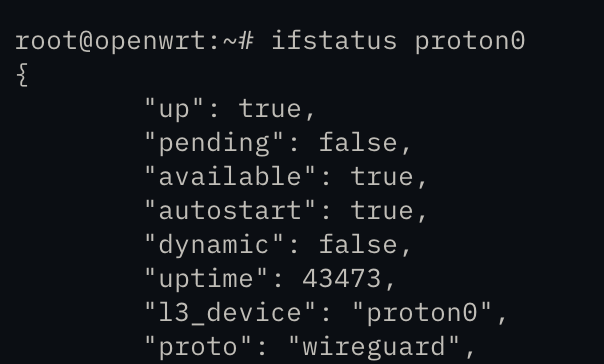
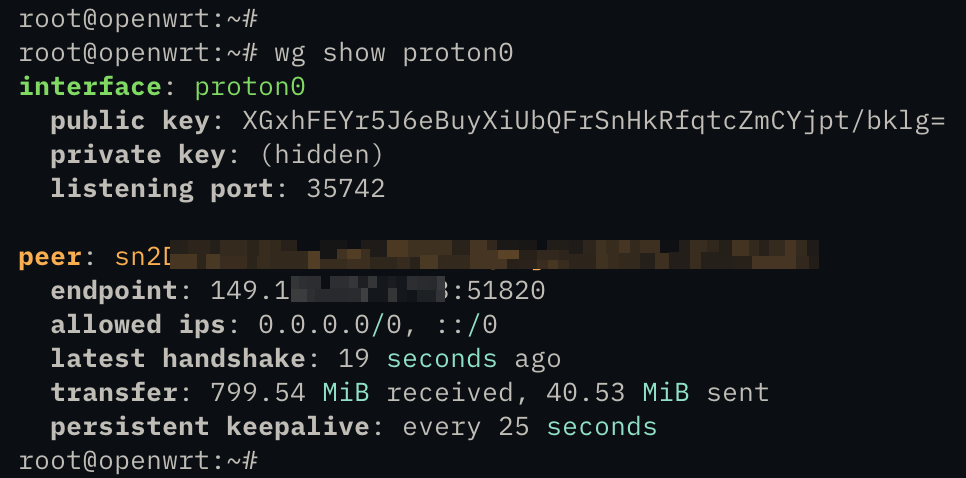
The command below shows the WireGuard handshake status with Proton. If it shows the latest handshake line, the connection is working.
wg show proton0
Conclusion
With this, the ProtonVPN integration is configured and the environment is prepared for using PBR in the next post. Below I put all the commands into a script. I am leaving it here even so I can copy it the next times I need to use it. Then I just run it and it configures everything:
./setup-proton.sh
#!/bin/sh
set -eu

WG_CONF="${1:-/root/proton.conf}"

if [ ! -f "$WG_CONF" ]; then
  echo "Config not found: $WG_CONF"
  echo "Usage: $0 /path/to/proton.conf"
  exit 1
fi

conf_get() {
  grep -m1 "^[[:space:]]*$1[[:space:]]*=" "$WG_CONF" \
    | cut -d= -f2- \
    | sed 's/^[[:space:]]*//; s/[[:space:]]*$//'
}

echo "Installing WireGuard packages..."
apk update
apk add kmod-wireguard wireguard-tools

echo "Backing up configs..."
cp /etc/config/network "/etc/config/network.bak.$(date +%s)"
cp /etc/config/firewall "/etc/config/firewall.bak.$(date +%s)"

PRIVATE_KEY="$(conf_get PrivateKey)"
ADDRESSES="$(conf_get Address)"
PEER_PUBLIC_KEY="$(conf_get PublicKey)"
ALLOWED_IPS="$(conf_get AllowedIPs)"
ENDPOINT="$(conf_get Endpoint)"
KEEPALIVE="$(conf_get PersistentKeepalive || true)"

ENDPOINT_HOST="${ENDPOINT%:*}"
ENDPOINT_PORT="${ENDPOINT##*:}"
ENDPOINT_HOST="$(echo "$ENDPOINT_HOST" | sed 's/^\[//; s/\]$//')"
KEEPALIVE="${KEEPALIVE:-25}"

if [ -z "$PRIVATE_KEY" ] || [ -z "$ADDRESSES" ] || [ -z "$PEER_PUBLIC_KEY" ] || [ -z "$ALLOWED_IPS" ] || [ -z "$ENDPOINT" ]; then
  echo "Failed to parse required values from $WG_CONF"
  exit 1
fi

echo "Configuring network interface proton0..."

uci -q delete network.proton0 || true
uci set network.proton0="interface"
uci set network.proton0.proto="wireguard"
uci set network.proton0.private_key="$PRIVATE_KEY"
uci set network.proton0.mtu="1420"

echo "$ADDRESSES" | tr ',' '\n' | while read addr; do
  addr="$(echo "$addr" | tr -d ' ')"
  [ -n "$addr" ] && uci add_list network.proton0.addresses="$addr"
done

uci -q delete network.wgproton || true
uci set network.wgproton="wireguard_proton0"
uci set network.wgproton.public_key="$PEER_PUBLIC_KEY"
uci set network.wgproton.endpoint_host="$ENDPOINT_HOST"
uci set network.wgproton.endpoint_port="$ENDPOINT_PORT"
uci set network.wgproton.persistent_keepalive="$KEEPALIVE"

# Important for PBR:
# AllowedIPs permits the tunnel to carry full traffic,
# but route_allowed_ips=0 prevents OpenWrt from making it the default route.
uci set network.wgproton.route_allowed_ips="0"

echo "$ALLOWED_IPS" | tr ',' '\n' | while read ip; do
  ip="$(echo "$ip" | tr -d ' ')"
  [ -n "$ip" ] && uci add_list network.wgproton.allowed_ips="$ip"
done

uci commit network

echo "Configuring firewall zone for proton0..."

uci -q delete firewall.vpn || true
uci set firewall.vpn="zone"
uci set firewall.vpn.name="vpn"
uci set firewall.vpn.input="REJECT"
uci set firewall.vpn.output="ACCEPT"
uci set firewall.vpn.forward="REJECT"
uci set firewall.vpn.masq="1"
uci set firewall.vpn.mtu_fix="1"
uci add_list firewall.vpn.network="proton0"

uci -q delete firewall.lan_vpn || true
uci set firewall.lan_vpn="forwarding"
uci set firewall.lan_vpn.src="lan"
uci set firewall.lan_vpn.dest="vpn"

uci commit firewall

echo "Applying changes..."
/etc/init.d/network reload
/etc/init.d/firewall restart

echo "Done."
echo
echo "Check tunnel status with:"
echo "  wg show"
echo "  ifstatus proton0"
echo
echo "PBR note:"
echo "  Use interface proton0 in your PBR policies."
echo "  This script did not change WAN DNS."
echo "  This script did not remove lan->wan forwarding."